
How do we get started with the Well-Being Index?
Configure your organization, invite your teams, see ranked results the moment anonymity thresholds clear, and measure change over time.
Getting Started
Four simple steps. Seamless integration.
Any administrator can run the full cycle — from setup to board-ready insight — without training, certification, or outside help.
- 01Setup · Under one weekConfigure your group, department, hospital, or entire health system.↓
- 02Invite · Under 60 seconds per responseInvite your team. Nine questions. No identifying data.↓
- 03Insight · Instant, once thresholds clearSee where it matters most, not just a feeling.↓
- 04Measure · Over timeProve which interventions actually worked.↓
Setup · Under one week
Configure your group, department, hospital, or entire health system.
You tell us your goals, which occupations you want assessed, and where your organization is in its wellness journey. We take it from there — determining and setting the unit breakdowns, the validated assessment each group takes, your first assessment window, and the reassessment timeframe that keeps the data meaningful over time.
- Self-administered or guided onboarding
- Roster imports for multi-site health systems — each participant creates their own private account in less than 1 minute
- Anonymity thresholds enforced by architecture, not policy
- We determine unit breakdowns, which roles to assess, and your assessment cadence
Invite · Under 60 seconds per response
Invite your team. Nine questions. No identifying data.
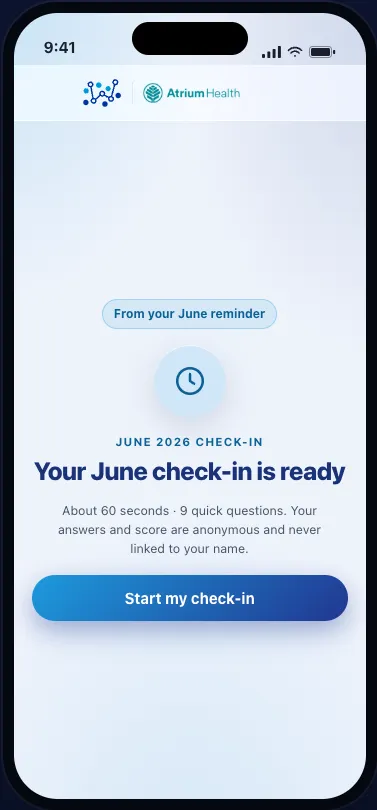
You invite your teams through the internal channels they already know and trust, using custom communication templates we provide. Your professionals take the validated assessment — nine questions, under a minute, anonymous by architecture. You see participation rates, not respondents.
- Invites go out through your own trusted internal channels, so they don't get caught by security filters or firewalls
- Custom communication templates provided for every invite and reminder
- 100% anonymous, individual scores never accessible to leadership or HR
- Professionals take the validated 60-second assessment on the web or in the mobile app
- Immediate crisis-resource pathways built into the assessment itself
Insight · Instant, once thresholds clear
See where it matters most, not just a feeling.
The Priority Dashboard is your starting point — it automatically ranks your highest-risk groups and the potential organizational impact behind each one, so you're not digging through multiple views or datasets just to figure out where to focus first.
- Highest-risk groups identified and ranked automatically
- Potential organizational impact surfaced for each priority area
- National benchmarks built in, across every role in your organization
Measure · Over time
Prove which interventions actually worked.
Reassess on an ongoing basis to track progress over time — often once or twice a year gives ample data to act on while minimizing survey fatigue. Use the Snapshot and Journey reports together to make the case. Hotspots & Bright Spots in the Snapshot automatically surface where concern is concentrated right now and what's already working well — and the Journey view tracks whether your peer-support program, scheduling redesign, or new benefit moved the curve over time, by segment, by dimension, in numbers your CMO, CNO, and board will accept.
- Hotspots & Bright Spots automatically surface current areas of concern and strength
- Journey trends well-being over time, through staffing changes and system events
- Compare role and department cohorts before and after any intervention
- Export board-ready reports and Joint Commission–aligned documentation
Well-Being Snapshot · Right Now, By Department
Getting started: common questions
How long does it take to set up the Well-Being Index?
Setup takes under one week. You tell the Well-Being Index team your goals, which occupations you want assessed, and where your organization is in its wellness journey. The team then sets your unit breakdowns, the validated assessment each group takes, your first assessment window, and your reassessment timeframe.
How are participants invited to the Well-Being Index?
Organizations invite their teams through their own trusted internal channels, using custom communication templates the Well-Being Index provides for every invite and reminder. Each participant creates their own private account, and administrators see participation rates, never individual respondents.
When do Well-Being Index results become available?
Well-Being Index results are available instantly once a group clears the anonymity threshold. The Priority Dashboard automatically ranks the highest-risk groups and the potential organizational impact behind each one, with national benchmarks built in.
How often should an organization reassess with the Well-Being Index?
Most organizations reassess once or twice a year, which gives ample data to act on while minimizing survey fatigue. The Journey report links every assessment cycle, so leaders can compare groups before and after any intervention.
More on how it works
Get Started
See exactly how this works for your organization.
Talk to a Well-Being Expert about your specific deployment, or explore a live demo dashboard yourself.
Download the Overview Guide
A one-page overview of the Well-Being Index — how it works, who it's for, and how 1,000+ healthcare organizations use it.
Download the guide → 20 minutes · most popularTalk to a Well-Being Expert
A live walkthrough tailored to your organization, your clinical populations, and your goals — plus a custom quote.
Book a meeting → Free access · self-guidedExplore a Live Dashboard
Instant access to a demo environment loaded with realistic sample data — the exact view your leadership team would see.
Open the demo →